Put your pages on the press sheet

Laydown lays PDF pages out for printing — two-up on A3, a saddle-stitched booklet, a sheet of labels — so they come out right after they're printed, folded and cut. Free, open source, and it runs on your machine.

Download for free View source

Windows · macOS · Linux — v0.4.5 · AGPL-3.0 · nothing uploaded, no account

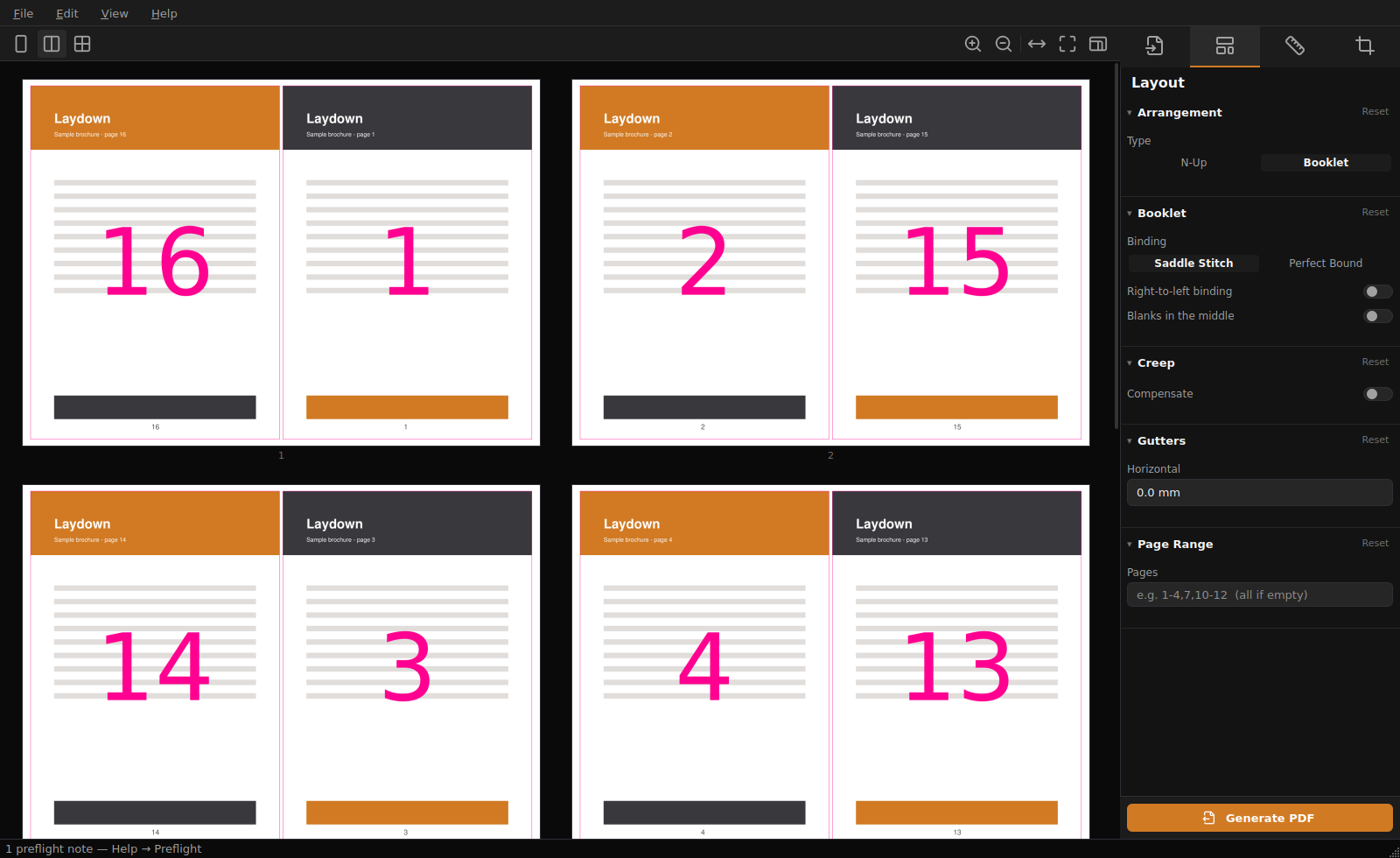
Laydown laying a 16-page booklet out on A3 sheets, with the settings panel showing booklet binding, creep and gutter controls

Built for work that goes to press

The details that decide whether a job comes back right.

Pages stay sharp

Your pages are embedded as vectors, never re-rendered into pictures. What comes off the press is exactly as crisp as what you put in — text is still text.

It reads print files properly

If your PDF has a trim box and bleed, Laydown uses them: it places the finished page and carries your bleed past the cut line. Ordinary PDFs with no boxes work fine too.

The preview is the sheet

What you see is rendered from a real imposition, and the pink outlines are the cut lines that run actually used. It can't show you one thing and print another.

It speaks up early

Margins that don't fit, a missing trim box, pages quietly being shrunk — Laydown says so while you can still fix it, instead of letting you find out at the guillotine.

Booklets that fold right

Saddle stitch or perfect binding with signatures. Page order is worked out for you, and creep compensation evens up the margins on thicker booklets.

Your marks, your way

Crop, gap crop, registration, fold, perforation, collating marks and a colour bar. Need your own bull's-eye or house colour bar? Point it at a PDF and it gets stamped on.
Four steps

Open, choose, check, generate.

Open your PDF. Drag it onto the window, or Ctrl+O.

Pick your sheet. Size, how many pages go on it, marks and bleed.

Check the preview. That's your printed sheet — the pink outlines are where it gets cut.

Generate PDF. Send it to the printer.

Download Laydown 0.4.5

Free, no account, no strings. Everything's included — no Python needed.

Windows

10 / 11 · 64-bit · installer or portable

Get the installer

Portable ZIP also on the releases page

macOS

11+ · Apple silicon & Intel

Get the .dmg

First launch: right-click → Open

Linux

x86_64 · portable tar.gz

Get the tarball

Extract and run — no install

The Windows and macOS builds aren't code-signed yet, so the first launch shows a "publisher unknown" warning — on Windows that's More info → Run anyway. Signing costs money and isn't there yet. You can always read the source or build it yourself.

Questions

Does it upload my documents?

No. There's no network code in it at all. It opens your file, writes a new one, and that's the whole story.

Does it cost anything?

No, and there's no paid tier. It's AGPL-3.0 — free to use, study and modify.

Will my pages lose quality?

No. Pages are placed as vectors rather than rasterised, so the output matches the source exactly.

What's creep?

Nest folded sheets inside each other and the inner pages stick out further at the open edge. Trimming the stack flush takes more off them, so their margins end up narrower. Creep compensation nudges the pages to even that out. On a thin booklet you can ignore it.

Can it do work-and-turn?

Not yet. That's a press technique where both forms go on one plate, and getting it subtly wrong wastes plates and paper — so it stays out until someone who runs a press has checked it.